
Merge
Type key: merge_node
Group: Flow Control
Category: flow
Tier: CORE
Version: 2.0.0
The Merge node joins data coming from multiple upstream branches back into a single stream. It is used after If/Switch nodes when you want to re-unify the execution paths, or after parallel branches that collect results from different sources.
Handles
| Handle | Direction | Description |
|---|---|---|
input | Input (multiple) | Accepts connections from multiple upstream nodes |
output | Output | Emits the merged result |
The Merge node is the only core node that accepts multiple input connections.
Configuration
| Field | Type | Default | Description |
|---|---|---|---|
label | string | Merge | Display label on the canvas |
mergeStrategy | enum | concat | How to combine the incoming data streams |
mergeKey | string | id | Key field used by key-based strategies |
Merge Strategies
concat
Concatenates all input arrays into a single flat array.
Input from branch A: [{id:1}, {id:2}]
Input from branch B: [{id:3}, {id:4}]
Output: [{id:1}, {id:2}, {id:3}, {id:4}]
Use this when branches produce arrays of the same type and you want to process them together downstream.
union
Concatenates all arrays then removes duplicates based on a mergeKey field (default: id). Each unique key appears only once in the output.
Input A: [{id:1}, {id:2}]
Input B: [{id:2}, {id:3}]
Output (mergeKey: id): [{id:1}, {id:2}, {id:3}]
intersect
Returns only items that are present in all connected branches, matched by mergeKey.
Input A: [{id:1}, {id:2}, {id:3}]
Input B: [{id:2}, {id:3}, {id:4}]
Output: [{id:2}, {id:3}]
Use this to find common records across datasets.
except
Returns items from the first branch that do NOT appear in any subsequent branch, matched by mergeKey.
Input A (base): [{id:1}, {id:2}, {id:3}]
Input B (exclude): [{id:2}]
Output: [{id:1}, {id:3}]
Use this to subtract one dataset from another.
join
Merges records with the same key from all branches into a single enriched record (inner join semantics — only records present in all branches are kept).
Input A: [{id:1, name:"Alice"}]
Input B: [{id:1, score:99}]
Output (mergeKey: id): [{id:1, name:"Alice", score:99}]
Merge Key
For union, intersect, except, and join strategies, configure the key field used to match records across branches. Defaults to id.
Note: even if upstream field inference is incomplete in the editor (e.g. you only see msg in a dropdown), you can still set mergeKey to a nested record key such as id — the merge strategies operate on the items inside each branch’s data array.
Behavior
When multiple upstream branches connect to a Merge node:
- The engine collects outputs from all connected branches
- Each branch's output data array is extracted
- The configured merge strategy is applied
- The merged result is wrapped in
{ "data": [...], "count": N }and passed downstream
Input shape
Merge expects to receive multiple upstream payloads. If an upstream payload has a data array (Data Model–style), Merge uses that array. Otherwise, the full payload is treated as a single record.
Output shape
The node returns a Data Model–style payload:
data: merged array of recordscount: number of merged recordsmerge_strategy: applied strategyinput_count: number of connected inputs
Example: Re-Unify After If Branch
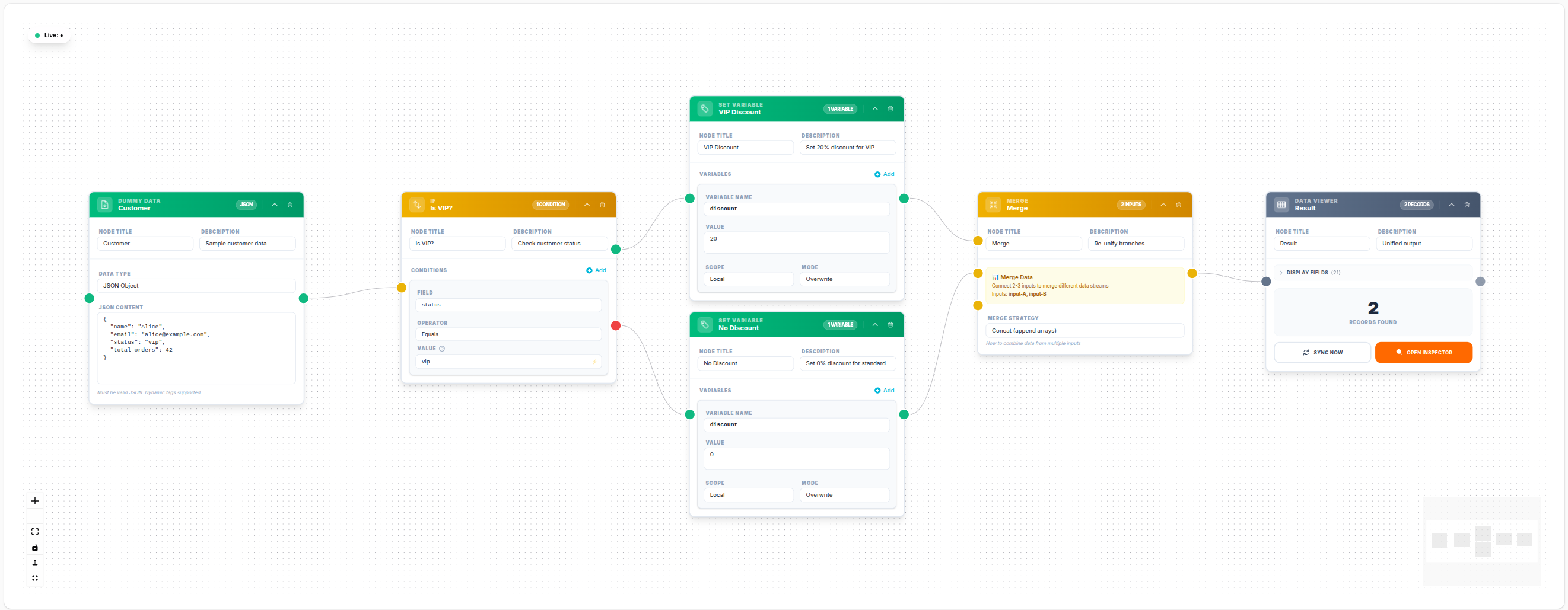
💾 Try this example
Download the workflow JSON — open an empty workflow and import the file.
Notes
- The Merge node requires at least two input connections to be meaningful; a single input just passes data through
- The
concatstrategy works with any data shape; the others require a consistent key field across branches - Variables and workflow-level context are preserved from all branches (later branches override earlier for duplicate keys)
- Use
intersect/exceptfor set operations on database result arrays